Get the Template Running
In the previous step you copied the plugin template into your plugins folder and renamed it. Before we change anything, let's look at what's inside and get it running.
What's in the template
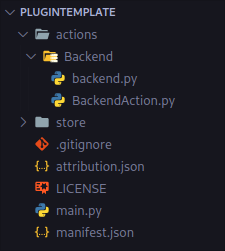
You'll touch these files most:
| File | What it's for |
|---|---|
main.py |
The entry point. It registers your actions with StreamController. |
actions/SimpleAction/SimpleAction.py |
An example action, the thing that sits on a button. |
manifest.json |
Your plugin's identity (name, id, version). |
assets/ |
Images your plugin ships, like the example info.png. |
Don't worry about the rest yet; we'll meet each file when we need it.
Run it
With StreamController running from source (see Set Up Your Environment) and at least one FakeDeck enabled:
- Open StreamController.
- Click an empty key to open the action picker.
- Find your plugin's Simple Action and add it.
You should see the example info icon appear on the key. Press the key, and watch your terminal:
That's it: a working action, drawing an image and reacting to a press. In the next steps we'll take this apart to understand how it works, then extend it.
Not showing up?
Make sure the plugin folder is inside your data plugins directory and that you launched StreamController with the --data data argument from the setup step. Errors usually appear in the terminal you started StreamController from.
Next: let's look at how the action draws its icon.